
ctrlSwitcher, A Safari 5 Extension


View All My Safari Extensions

On the Ars Technica forums someone mentioned that they’d like to be able to switch between tabs using command + numbers to choose tabs. I took a look at the Safari extension system, and while you can’t override the shortcuts bound to cmd 1-91 for some reason, control is available. An hour or so later and ctrlSwitcher was born.
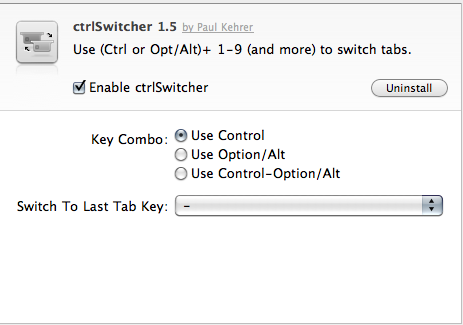
Features

  • Use a modifier (ctrl by default) + the number keys to instantly jump to a tab. Keys 1 through 0 will go to tabs 1-10, and keys q through p will go to tabs 11-19.
  • Configurable modifier key
  • Configurable “go to last tab” key

Download and Use

  • Download the signed extension and double click to install
  • Pick if you want to use ctrl, opt, or ctrl+opt as your meta keys (default ctrl) in the prefs
  • Now close all tabs or restart your browser. ctrlSwitcher has to load a small script in each loaded tab (empty tabs cannot be switched to/from due to limitations on extensions)
  • Note for Windows users: You will need to switch your default modifier key from ctrl to alt or ctrl+alt to have this tool work.

v1.6:

  • Adds cmd+opt as a choice for key combo (see the commit)

You can view the source on GitHub as well! If you have suggestions for improvements let me know! Bug reports should be directed to the issues page.

  1. cmd-1 through 9 are assigned to bookmarks on your bookmarks bar in Safari

36 Comments

  1. DCJ001 June 12, 2010

    I currently use Control-1, 2, 3, etc. for switching from Space to Space. I’ve tried using Option and Control-Option for this extension and I have had no success. I use a handful of other extensions, so I’m curious as to why I’m not getting anywhere with this one.

    Any suggestions?

  2. Paul Kehrer June 12, 2010

    Hmm, are you in 10.5 or 10.6? I’m just trying to figure out what differences there could be that would cause the extension to have problems.

  3. DCJ001 June 12, 2010

    Safari 5 with 10.6.3

  4. modder June 12, 2010

    This has a few bugs

    first, it will switch from the second or greater tab back to one before it, but not from a lower number to a higher number. Also, pressing the number without control will move you from tab to tab which gets annoying. im on Safari 5 with OS X 10.6.3

  5. Marijn June 13, 2010

    Hi, could you make it so that navigates through tabs?

  6. Lari Kovanen June 13, 2010

    Before I could use this extension I had to restart Safari. Maybe you should write that down in the “instructions” on how to use it too.

  7. Paul Kehrer June 13, 2010

    I can’t replicate the “second or greater” bug, but I have seen the no ctrl required bug. Unfortunately I’m not sure what can be done about that at the moment. This extension works by sending events on keydown and keyup events for the meta keys (ctrl, opt). If the keyup event doesn’t fire properly from the browser then the extension will continue to think it was pressed.

    Update: Keydown/keyup events reworked. Much better now.

  8. Paul Kehrer June 13, 2010

    DCJ, did you restart your browser and open a few tabs with websites loaded in them? (This extension requires that because I have to inject scripts, which can only be done on loaded pages)

  9. Goowa June 13, 2010

    Could you please Add ⌘ key (command key) for key combo please ? or i download source code and improve it by myself ?

    regard.

  10. Paul Kehrer June 13, 2010

    You are welcome to fork the source on github and try to add command key. I attempted to implement it, but it appears Safari (for security reasons probably) doesn’t allow you to override pre-existing shortcuts. Since ⌘ 1-9 are bound to bookmarks bar URLs, it doesn’t work.

    If you manage to get it working I’ll be happy to merge it back into the master branch though!

  11. DCJ001 June 13, 2010

    I did you restart Safari and I opened a few tabs with websites loaded in them. I also rebooted by Mac. I also thought that there may have been some type of conflict with my Spaces keyboard commands using Control (I was using Option or Option-Control for this extension), so I tried disabling Spaces with no success.

    I also logged into a Guest account, loaded the extension, and found that it did not work.

    Sorry that I can’t be of more help. Good luck in your efforts to resolve the questions.

  12. [...] Kehrer has developed an extension for Safari 5 called “ctrlSwitcher.” The extension let’s you use control or option + number keys to switch between tabs. [...]

  13. Niek June 13, 2010

    Nice extension!

    Only drawback is that by using option+number, Safari inserts a special character (example: option+2 inserts ™) into the active textfield before switching tabs.

    Could you try to fix this? Thanks!

  14. Joyce June 13, 2010

    What about Windows users who don’t have an Option key?

  15. Joyce June 13, 2010

    Nevermind, I got it.

  16. Paul Kehrer June 13, 2010

    I believe alt sends the same keyCode, but I’ll investigate right now. If it does, I’ll update the extension to clear up the confusion!

  17. Paul Kehrer June 13, 2010

    Yeah I’m working on a major update now that fixes some event propagation issues and is far more reliable for detecting the ctrl/opt keys.

  18. Paul Kehrer June 13, 2010

    Niek, this bug is now fixed in 1.2. Grab the new copy (I’ve also inserted autoupdate so you won’t have to do it manually in the future).

  19. [...] ctrlSwitcher – Tabs direkt mit Befehl+Zahl ansteuern. [...]

  20. Paul Kehrer June 13, 2010

    DCJ, I’ve rewritten most of the switching code for the latest version. Do you still see the issue?

  21. Niek June 14, 2010

    Thanks Paul, works like a charm now!

  22. Rajan June 14, 2010

    please make it work for windows users too

  23. Paul Kehrer June 14, 2010

    Could you elaborate on your problem? I just tested the latest version with Safari 5.0 on XP SP3 and ctrl, alt, and ctrl+alt all worked as choices for tab switching.

    If it doesn’t appear to work right after install be sure to reload all your tabs for the switching to work (or just restart the browser)

  24. Zaudragon June 18, 2010

    I like this extension a lot; thanks for it!
    My only gripe was that it only worked with 9 tabs; if we’re gonna use a special key combo after all, why not have 19 (or more)? Irssi does it by mapping 0 to 10, and Q through O to 11 through 19. I went ahead and implemented it myself.
    The patch is here: http://pastebin.com/pqRumsxi
    The only problem is that ^Q needs to be pressed twice for some reason.

  25. Jay June 19, 2010

    Doesn’t work when the cursor is in the address bar (i.e., not focused on the page itself). It seems that this is just a limitation of Safari extensions though: you can only listen for page events, not \application level\ events. Anyone know how to get around this?

  26. Starless June 23, 2010

    amazing, thanks!

  27. Paul Kehrer June 26, 2010

    Unfortunately I’m not aware of a workaround at this time. keyDown/Press/Up events don’t bubble up to the safari javascript object so I can’t capture them without an injected script. File a feature request with Apple if you’d like to see this added to Safari! https://bugreport.apple.com/

  28. [...] ctrlSwitcher [...]

  29. Yurii Soldak July 3, 2010

    Paul, thanks for the useful extension!

    Have the same problem with keyboard shortcuts in my extension :/
    Hope they add shortcut support for extensions soon.

  30. [...] 网站:http://langui.sh/ [...]

  31. [...] ctrlSwitcher, A Safari 5 Extension | langui.sh [...]

  32. [...] crtlSwitcher kann man mit dem Tastaturkürzel ctrl + 1-9 direkt zum entsprechenden Tab wechseln. Allerdings [...]

  33. Forte August 14, 2010

    Very nice extension! About the use of command key – I understand Safari uses cmd- combo for quickly getting to the links stored in the bookmark bar, but if I don’t have any bookmark there, is it possible to reclaim the use of cmd keys? Hitting cmd- has become my muscle memory and it’s hard to get rid of.

    A second suggestion: is it possible to reserve ctrl-9 to switch to the right-most tab? This would make the behavior more in-line with Firefox and Chrome.

    Thank you again for the wonderful work!

  34. The Setup - mickerlodeon September 1, 2010

    [...] not used to the keyboard shortcuts for switching tabs but a great little extension called “ctrlSwitcher” has eased the pain a bit. Safari is significantly more stable than Firefox has ever been and [...]

  35. Michelle September 12, 2010

    This is just not working for me. I have it installed, and now even ctrl+t won’t work to open a new tab. When I do open a new tab and press ctrl+1, it just opens the first bookmark. I am a windows user, by the way.

  36. Olivier July 10, 2011

    For command key support, use https://github.com/rs/SafariTabSwitching

Leave a Reply

Your email address will not be published. Required fields are marked *

You may use these HTML tags and attributes: <a href="" title=""> <abbr title=""> <acronym title=""> <b> <blockquote cite=""> <cite> <code> <del datetime=""> <em> <i> <q cite=""> <strike> <strong>